

Every growing product hits the same moment. Dashboards turn red at lunch peak, the API slows to a crawl, and someone in the war room says the word that has burned more engineering quarters than any other: "We need to shard."
Usually, you don't. Not yet.
Most lists of database scaling techniques treat them as a menu where you pick whatever sounds impressive. I think of them as a ladder. Each rung gives you more capacity, but it also adds complexity that you will own for the life of the system. Start at the bottom and only climb when the rung you're on has nothing left to give.
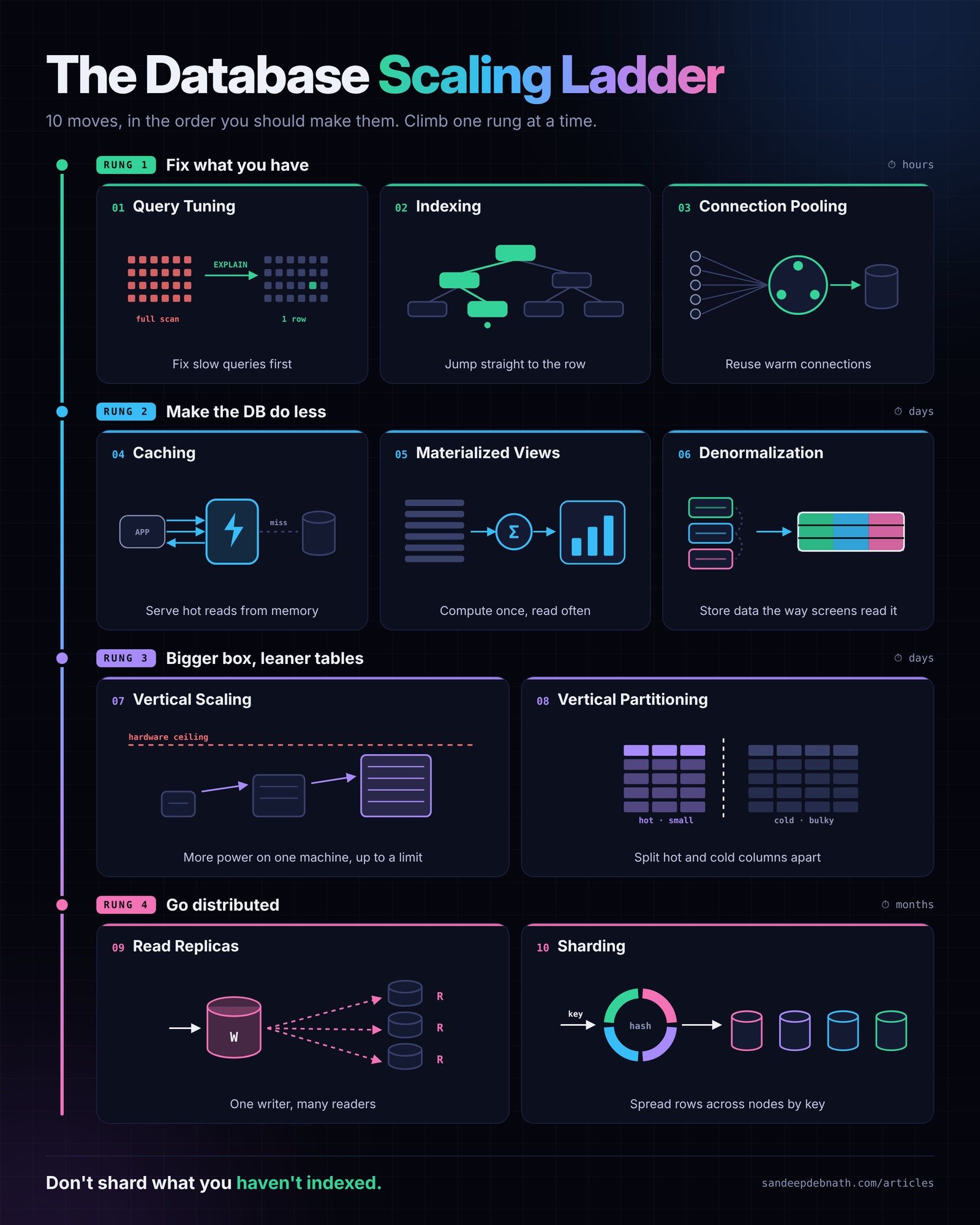
Rung 1: Fix what you already have
Effort: hours. Risk: low. Most teams skip this rung, and they shouldn't.
01. Query tuning
Before you add a single server, run EXPLAIN ANALYZE on your slowest queries. In nearly every system I've worked on, a handful of queries account for most of the database load. Typical causes: an ORM producing N+1 queries, a SELECT * that drags along a 2 KB JSON column nobody reads, or a function wrapped around an indexed column that quietly forces a full scan.
Turn on your slow query log, sort by total time (frequency × duration) rather than worst single run, and fix the top ten. This is the best return you will ever get on database work.
02. Smart indexes
An index turns "read every row" into "go straight to the right row." The basics are simple: index the columns you filter, join and sort on. The craft is in the details:
- Composite index order matters. An index on
(restaurant_id, created_at)serves "this restaurant's orders today." An index on(created_at, restaurant_id)mostly doesn't. - Covering indexes let the database answer a query without touching the table at all.
- Partial indexes (
WHERE status = 'active') stay small and fast when most of your rows are history.
The catch is that every index is a tax on writes. Remove the ones nothing uses. Your write-heavy tables will thank you.
03. Connection pools
Opening a database connection costs a TCP handshake, TLS, authentication and process setup. Do that per request at scale and the database spends its time greeting clients instead of serving them. PostgreSQL in particular struggles once you go past a few hundred direct connections.
A pooler (PgBouncer, RDS Proxy, or HikariCP inside the app) keeps a small set of warm connections and shares them. If your database CPU is calm but you're hitting "too many connections" during traffic spikes, this is your rung.
Rung 2: Make the database do less
Effort: days. Risk: stale data. You're trading freshness for speed, so do it on purpose.
04. Cache layer
The fastest query is the one you never send. Put Redis or Memcached in front of data that is read far more often than it changes: restaurant menus, store hours, product catalogues, user profiles.
The hard part isn't adding the cache. It's invalidation. Decide upfront, for each cached object, how stale it may be. A menu can be 60 seconds old. A wallet balance can't be stale at all. Write that rule down before you write any code.
05. Precomputed (materialized) views
If your admin dashboard runs "revenue by city by day" over millions of order rows every time someone opens it, you're paying for the same answer again and again. A materialized view runs the heavy GROUP BY once, stores the result as a table, and refreshes on a schedule or on change.
This is ideal for reporting, leaderboards and analytics screens where "as of 5 minutes ago" is perfectly fine.
06. Read-shaped tables (denormalization)
Normalization is right for writing data correctly. But if your busiest screen joins orders, customers, restaurants and riders on every load, you are rebuilding the same shape thousands of times a minute.
Denormalizing means storing data the way your screens read it: copying customer_name and restaurant_name onto the order record, for example. Reads get dramatically cheaper. The cost moves to the write side, because when a restaurant renames itself, something now has to update the copies. Use events or background jobs for that, and accept that the copies may be briefly inconsistent.
Rung 3: Bigger box, leaner tables
Effort: days. Risk: you will eventually hit a ceiling.
07. Scale up (vertical scaling)
More vCPUs, more RAM, faster disks. On a managed cloud database it's often a few clicks and a short failover. It's unglamorous and it works, and nobody gets promoted for it, which is exactly why teams underuse it.
Use it to buy runway, not to replace a strategy. Cost grows faster than capacity at the top end, the biggest instance is a hard ceiling, and it's still one machine. Scale up, then use the time you bought to fix the real bottleneck.
08. Column split (vertical partitioning)
Wide tables are slow tables. If your users table carries a bio, an avatar blob, preference JSON and twenty rarely touched columns, every hot lookup drags all of it through memory.
Split it: users_core (id, name, phone, email) for the login and checkout path, and users_profile for everything else. Hot rows get smaller, more of them fit in memory, and the cache hit ratio goes up for free.
Rung 4: Go distributed
Effort: months. Risk: permanent. Decisions made here are very expensive to undo.
09. Read replicas
Keep one primary for writes and stream changes to replicas that serve reads. For read-heavy products, and most consumer apps are read-heavy, this multiplies read capacity with little application change.
But replication is asynchronous, and lag is a product problem, not just an infrastructure one. A customer places an order, the app redirects to "My Orders," the read hits a replica 300 ms behind, and the order isn't there. Route read-your-own-writes traffic to the primary, or pin a user to the primary for a few seconds after they write.
10. Sharding
When writes outgrow the biggest machine you can buy, you split the rows themselves across nodes by a shard key: by city, by tenant, by hashed user ID.
Sharding is the most powerful rung and the most permanent one. Choose the key like a marriage:
- Bad key, hot shard. Shard a delivery platform by city and your capital city becomes one overloaded node while the rest sit idle.
- Cross-shard queries hurt. Anything that needs data from every shard (global reports, search, uniqueness checks) becomes a distributed systems problem.
- Resharding is a project, not a task. Plan for it from day one with consistent hashing or logical shards that map onto fewer physical nodes.
Before building your own, look seriously at systems that shard for you: Citus, Vitess, CockroachDB, YugabyteDB, Aurora Limitless, Spanner. You'll still have to model your data well, but you won't be writing a routing layer at 2 a.m.
How to tell which rung you're on
When the database is on fire, ask these in order:
- Which queries consume the most total time? If a few dominate → Rung 1.
- Are we reading the same data repeatedly? → Rung 2.
- Is the machine itself saturated after rungs 1–2? Buy time → Rung 3.
- Are reads still saturating the primary? → Replicas.
- Are writes still saturating the biggest primary? Only now → Sharding.
The order matters because complexity compounds. A sharded, replicated, cached, denormalized system is something every engineer you hire has to understand, every incident has to work through, and every migration has to respect. Each rung has to justify its cost.
The takeaway for engineering leaders
The teams that scale best aren't the ones with the most sophisticated architecture. They're the ones that measure first, climb last, and squeeze each rung dry before stepping up.
So the next time someone says "we need to shard," ask one question first:
"Show me the slow query log."
You'll be surprised how often the conversation ends there.
Which rung is your team on right now, and which one did you climb too early? I'd love to hear the stories. Connect with me on LinkedIn.


